Control access. Track changes. Find anything fast.
An ERP is only as good as the foundation it runs on. Statim ERP gives you 34 granular permissions, full audit trails on every record, two-factor authentication, and a global search that covers 21 entity types. Your team works faster because the platform handles the rest.
The backbone your operations need to scale with confidence
Security without friction
34 permissions across 10 categories, two-factor authentication via SMS or email, and role-based access that controls exactly who sees what. Protection built into every screen, not bolted on.
Visibility into every change
Every create, update, and delete is recorded with before-and-after snapshots, timestamped and tied to the user who made it. When someone asks "who changed this?", you have the answer in seconds.
Everything in one search
One search bar. 21 entity types. Clients, orders, BOMs, work orders, invoices, serial numbers. Hit Cmd+K and find what you need without clicking through menus.
34 permissions across 10 categories. You decide who sees what.
Most ERPs give you "admin" and "everyone else." That forces a choice: either lock people out of what they need or give them access to things they should not see. Statim ERP gives you 34 granular permissions organized into 10 groups: general access, users, items, inventory locations, timesheets, work orders, projects, tasks, reports, and integrations. Assign them to named roles, and every screen adapts.
Hierarchical permissions that cascade
Permissions follow a parent-child structure. Grant "work order write" and "work order read" comes with it. Grant "report read" and individual report types (balance sheet, P&L, items, sales profitability, purchase details, cost variance) become available. No checkbox marathons.
Three access tiers built in
Developer, Admin, and Client Portal access levels keep your internal team and your customers in their own lanes. Your client sees their portal. Your warehouse manager sees inventory. Your accountant sees financial reports. Same system, different views.
Roles that match your org chart
Create as many roles as you need. "Shop Floor Operator" gets work order read and punch-in access. "Purchasing Manager" gets PO write, bill access, and supplier management. Name them whatever fits your team.
Role configuration page showing permission groups (General, Users, Items, Inventory, Timesheets, Work Orders, Projects, Tasks, Reports, Integrations) with toggle switches for each permission
Every change, every user, every timestamp. Nothing lost.
Statim ERP records a full audit trail on 18+ model types across your system: items, orders, purchase orders, invoices, estimates, bills, work orders, BOMs, serial units, users, taxes, and more. Every entry captures old and new values side by side, the user who made the change (with a snapshot of their profile at that time), the IP address, and the exact timestamp. Your auditor will thank you.
Audit trail timeline for a purchase order showing created, updated, and status change events with user names, timestamps, and before/after value comparisons
Two-Factor Authentication
SMS or email verification, toggled per user from their account settings. Your team picks the method that works for them. No app installs required, no friction added.
Multi-Language Support
Full English and French localization across the entire interface. Every label, notification, and system message is translated. Users set their own language preference, and the system adapts.
Notification Preferences
11 notification types covering low stock alerts, order events, timesheet status, task reminders, invoice posting, and client onboarding. Each user controls which notifications they receive. Admins customize email templates with dynamic variables per locale.
21 searchable entity types
Clients, providers, items, orders, estimates, invoices, purchase orders, bills, work orders, BOMs, serial units, tasks, users, credits, payments, deals, UOMs, projects, machines, capabilities, and employees. Type a name, a number, or a keyword and results appear instantly.
Keyboard-first access
Hit Cmd+K on Mac or Ctrl+K on Windows and start typing. No mouse, no menus, no clicking through navigation trees. Power users stay in their flow.
Permission-aware results
Search results respect your access control settings. A user without work order permissions will not see work orders in their results. A client portal user only sees what they are authorized to see. The search is fast because it is scoped to what matters for each person.
Global search overlay showing mixed results: a client name, a PO number, an item SKU, and a work order, with entity type labels and direct navigation links
Comment threads on every record that matters
Your team discusses orders in email, PO issues in chat, and production problems on the shop floor. The context never makes it back to the record. Statim ERP puts comment threads directly on orders, purchase orders, estimates, invoices, bills, work orders, BOMs, projects, serial units, and user profiles. Attach files to comments. Keep the conversation where the data lives.
File attachments on every comment
Attach photos, PDFs, or documents directly to a comment. A quality issue on the shop floor gets documented with a photo, linked to the work order, visible to everyone who needs it. No separate file share required.
Full context, not forwarded emails
When a new team member opens a purchase order, they see the entire discussion history. Who flagged the pricing discrepancy. Who approved the change. What file was attached as backup. Context stays with the record, not in someone's inbox.
Comments across 11 record types
Orders, purchase orders, estimates, invoices, bills, work orders, BOMs, projects, serial units, user profiles, and CRM activities. If your team needs to discuss it, there is a comment thread on it.
Comment thread on a work order showing multiple team members, timestamps, attached files, and inline discussion about a production issue
Your key metrics, one screen, every morning
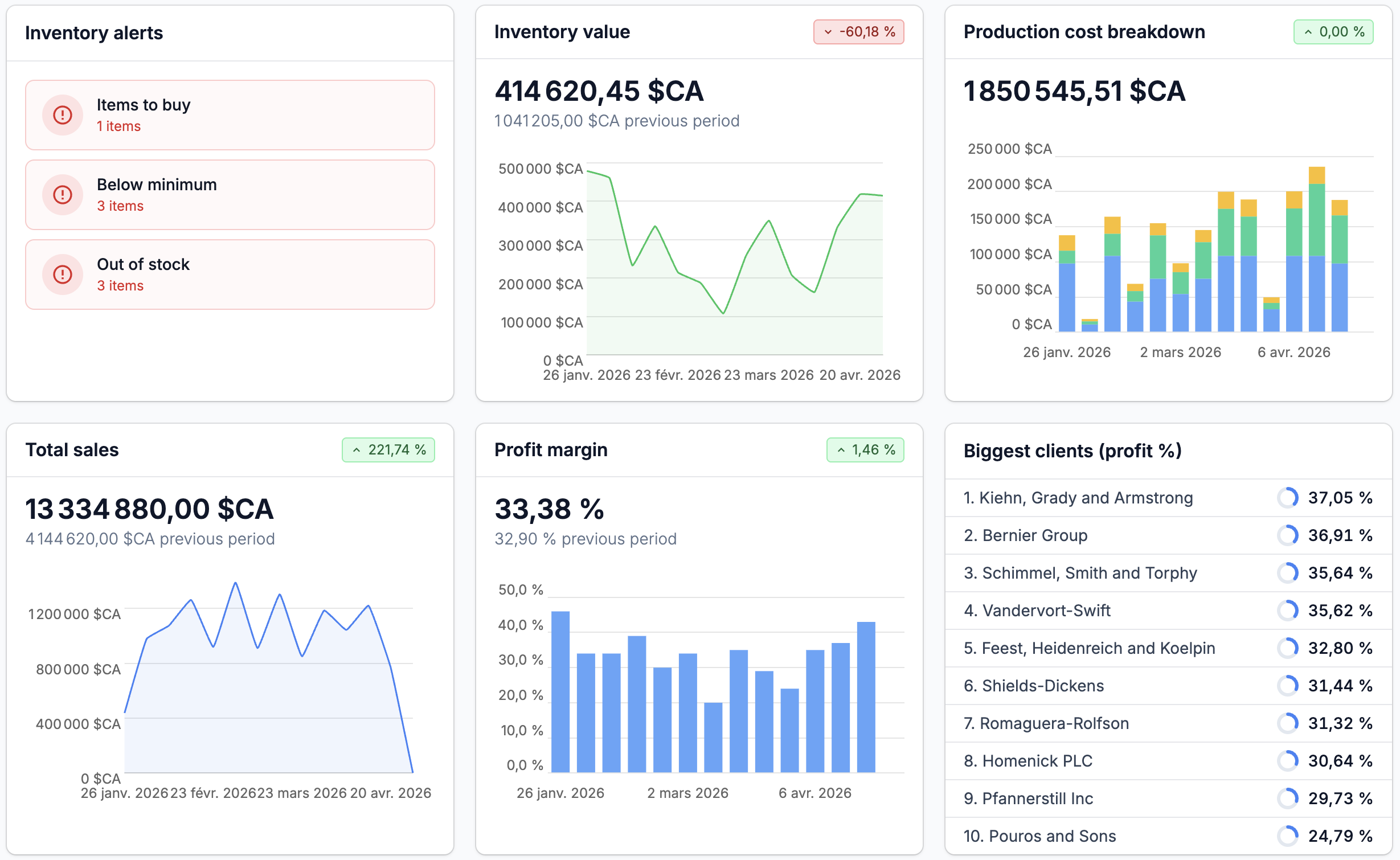
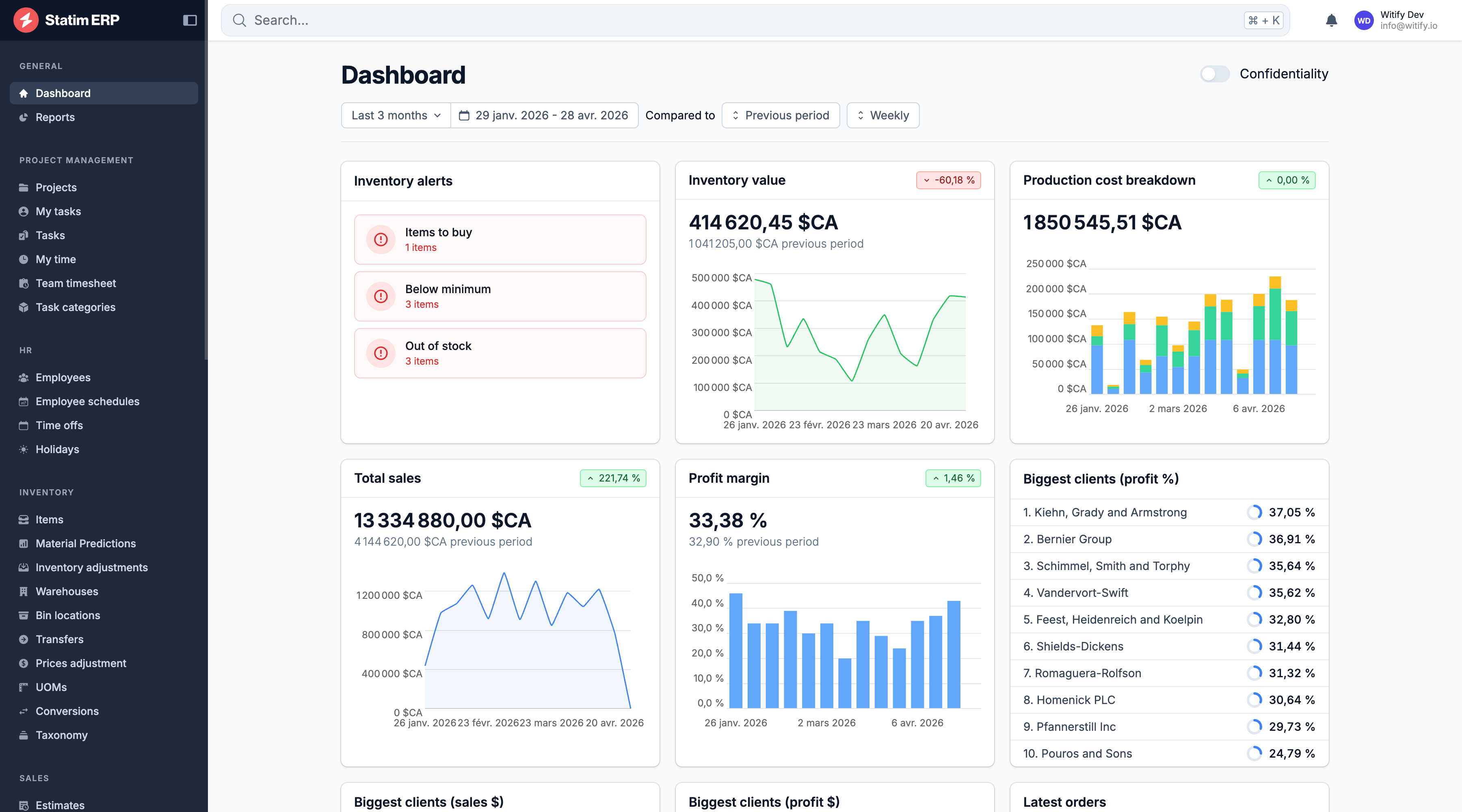
The Statim ERP dashboard surfaces inventory stock levels, inventory value trends, sales graphs, margin analysis, top clients by revenue and profit, and latest orders. Filter by date range, compare periods side by side, and group data by day, week, month, or year. A confidentiality mode hides financial data when you are sharing your screen. If your accounting software is connected, sync issues appear on the dashboard too.
Guided client onboarding
New clients register through a branded onboarding form: company details, shipping and billing addresses, personal information, service contract uploads, and language selection. The form feeds directly into your CRM. No manual data entry on your side.
Real-time in-app notifications
Low stock alerts, new orders from the client portal, timesheet approvals, task reminders, and invoice postings appear as in-app notifications and optional emails. The system uses rate limiting so your inbox is not flooded with duplicates.